Managing money can feel overwhelming, especially when an unexpected expense shows up. Whether you are tracking daily spending, planning for a goal or keeping bills in check, having a clear plan brings real peace of mind.
A budget planning app adds structure to that plan. It does the math, remembers your bills and shows you where you stand at a glance.
Below are six benefits of using one, a worked example, and what to look for before you choose. If you are new to the idea, start with what budgeting is.
|
Key takeaways • An app shows where your money goes and what is left after each bill. • Repeating bills and paychecks fill themselves in, so setup is quick each month. • Goals and debt payoff are easier to stick with when you can see progress. • You do not need to link your bank to get these benefits. • The best app is the one you will open every week. |
1. Complete visibility into your money
Many people do not know exactly where their money goes. Small purchases add up quietly, and by the end of the month the balance is lower than expected.
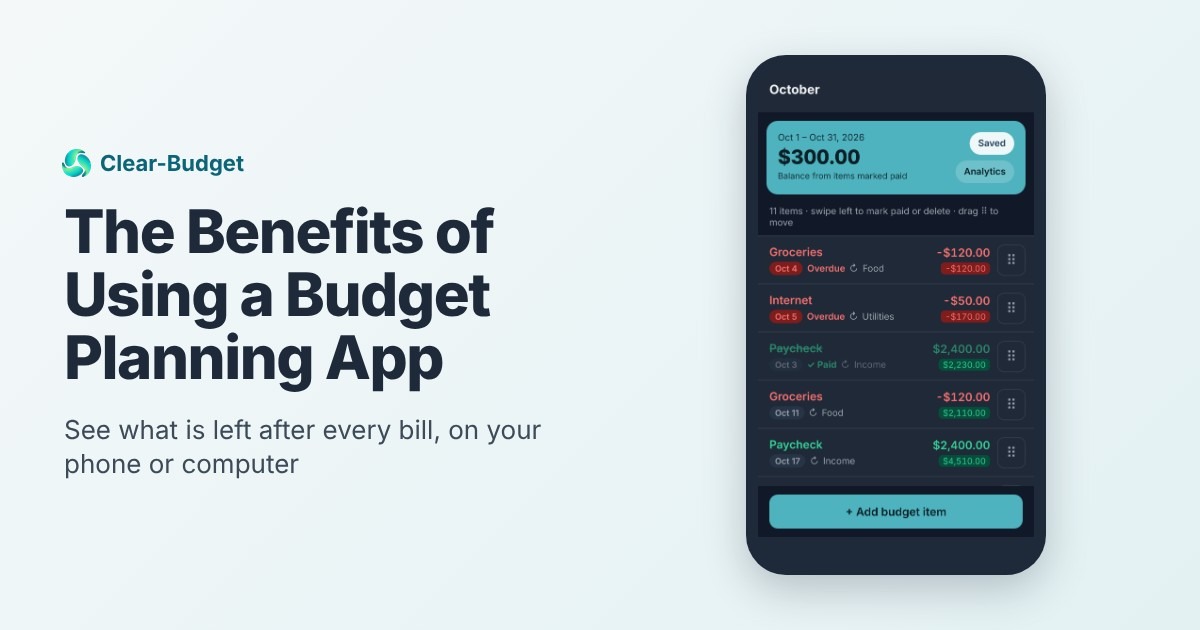
A budget app puts every paycheck and bill in one list. In Clear-Budget, each item shows a running balance, so you can see what you will have left after rent, after groceries and after every other bill.

You are never left wondering where the money went, because you can see it before it goes.
2. Less manual work every month
Budgeting by hand takes time. You copy the same bills every month and redo the math each time something changes.
An app does the repetitive part for you. In Clear-Budget, a bill or paycheck can repeat weekly, every two weeks or monthly, and it fills itself in through the whole budget.
You can budget over any dates, a full month or just until your next paycheck. When one number changes, every balance after it updates on its own.
3. Set and reach financial goals
Whether you are saving for a car, a vacation or an emergency fund, seeing progress keeps you motivated. Goals feel real when you can watch them grow.
Clear-Budget has buckets for savings goals and for debt payoff. A debt bucket tracks the balance and interest, and a slider shows how your payoff date moves when you change the monthly payment.
Want to try that math now? The free debt payoff calculator works without an account.
4. Stay on top of your bills
Late fees and missed payments cost money and can hurt your credit score. Knowing what is due, and when, is half the battle.
In Clear-Budget, every bill sits on its due date. Overdue items turn red, and you swipe to mark a bill paid once it is done.
Bill reminders on the phone are coming soon. Until then, a quick look at the list on payday shows everything due before the next check.
5. Insights into your spending
An app can show patterns that are hard to spot on paper. Maybe dining out is bigger than you thought, or one category grows every month.
The budget breakdown in Clear-Budget adds up your income and expenses, shows what is left over, and splits spending by category. For more ways to see where money goes, read about zero-based budgeting, where every dollar gets a job.
6. Private and with you anywhere
Your budget should be easy to reach and safe. Clear-Budget works on the web and as a phone app, and the phone app keeps working offline.
You sign up with Google or email, and Clear-Budget never asks for your bank login. You enter your own bills and paychecks, so nothing is pulled from your bank.
Worked example: Chris spots a short week early
Chris is paid $1,600 every two weeks. He sets up a budget from his October 3 payday to the day before his next one on October 17.
Here is his list with the running balance after each item:
|
Date |
Item |
Amount |
Balance left |
|
Oct 3 |
Paycheck |
+$1,600 |
$1,600 |
|
Oct 3 |
Savings transfer |
-$100 |
$1,500 |
|
Oct 4 |
Groceries |
-$120 |
$1,380 |
|
Oct 5 |
Rent |
-$1,100 |
$280 |
|
Oct 8 |
Phone |
-$60 |
$220 |
|
Oct 9 |
Gas |
-$50 |
$170 |
|
Oct 11 |
Groceries |
-$120 |
$50 |
|
Oct 14 |
Credit card payment |
-$75 |
-$25 |
Chris's paycheck budget for October 3 to October 16.
On October 3, Chris can already see the balance would go $25 below zero on October 14. On paper, he might not have noticed until the card payment bounced.
He lowers the second grocery trip to $95 and plans meals from the pantry that week. The balance now ends at $0, and the card payment goes through on time.
App vs. spreadsheet vs. paper
Paper and spreadsheets work, and plenty of people budget well with them. The difference is how much effort each week takes.

If you love spreadsheets, keep using them. If budgeting keeps falling off your list because it feels like work, an app is worth a try.
What to look for in a budget planning app
Before you choose, check for these:
• Free or low cost, with no surprise trial that ends
• Works the way you are paid, by month or by paycheck
• Shows what is left after each bill, not only totals
• Handles repeating bills without retyping
• Does not require your bank login if you prefer to keep it private
• Works on your phone, ideally offline
• Easy to start, with a guide or practice budget
Whichever you choose, the habit matters most. These tips to stick to a budget help whatever tool you use.
Who gets the most out of a budget app?
Almost anyone can benefit, but an app helps most if one of these sounds like you:
• You are paid every two weeks. Planning one paycheck at a time is much easier with dates and a running balance. See how to budget a biweekly paycheck.
• Your bills are spread across the month. Seeing each due date next to your paydays shows which check covers which bill.
• You have tried budgeting before and quit. Less math and less retyping means less reason to stop.
• You are paying off debt. Watching the balance fall and the payoff date move closer keeps you going.
• You share money with a partner. One plan you can look at together during a monthly money talk keeps you on the same page.
An app does not replace the habit of checking in. It makes that habit faster. Our guide on how to track your spending shows simple ways to do the weekly check.
A good first goal is small: open the app on every payday for one month. Most people find it takes only a few minutes once the repeating items are in.
Why Clear-Budget?
Clear-Budget was built out of a real problem. I struggled to find a budget planner that showed me, simply, what I would have left after each bill, so I built one.
It is a community-driven project. The features are shaped by feedback from the people who use it every day.
It is free, it works on your phone and computer, and a guided tour walks you through a practice budget before you make your own. Start your free budget, or follow our step-by-step first budget guide alongside it.
Frequently asked questions
Are budget planning apps worth it?
For most people, yes. They save time on math and repeating bills and make it easier to check in every week, which is what keeps a budget working.
Do I have to link my bank account to use a budget app?
Not with every app. Clear-Budget never asks for your bank login; you enter your own paychecks and bills.
Is a budget app better than a spreadsheet?
It depends on you. A spreadsheet is flexible but takes setup and upkeep. An app is quicker to start and easier to use on your phone.
Is Clear-Budget free?
Yes. Every feature is free, with Google or email sign-up.
Can I budget by paycheck instead of by month?
Yes. In Clear-Budget a budget can cover any dates, including just until your next paycheck.
This article is for general education and is not financial advice. Consider your own situation or talk to a qualified professional before making financial decisions.